Connecting banks
Connect a bank through Plaid, keep it syncing, fix a connection that needs you, and disconnect it when you’re done.
On this page
When you connect a bank, its accounts and transactions come into Prosperia and update on their own. You connect a bank from You → Accounts → Add your money, from the Bring in your accounts. step when you first set up Prosperia, from Today before you've added any accounts, or from Activity while it has no transactions.
Connected banks need a subscription. Everything else, including file imports and accounts you add by hand, is free. See Subscription.
Connect a bank
- On Today, tap the person button at the top, then tap Accounts.
- Tap Add your money.
- Tap Connect a bank.
- If you don't have a subscription yet, Apple's subscription sheet opens with the title Keep your banks syncing. Subscribe there, or close it to stop.
- Plaid's own sign-in opens. Find your bank and sign in there. Plaid may ask which accounts to share.
- When you finish, Prosperia shows a sheet that says [your bank] is connected.
If you close Plaid's sign-in before you finish, nothing changes and you're back where you started, so you can try again.
You can connect as many banks as you like. Repeat these steps for each one.
What Prosperia sees
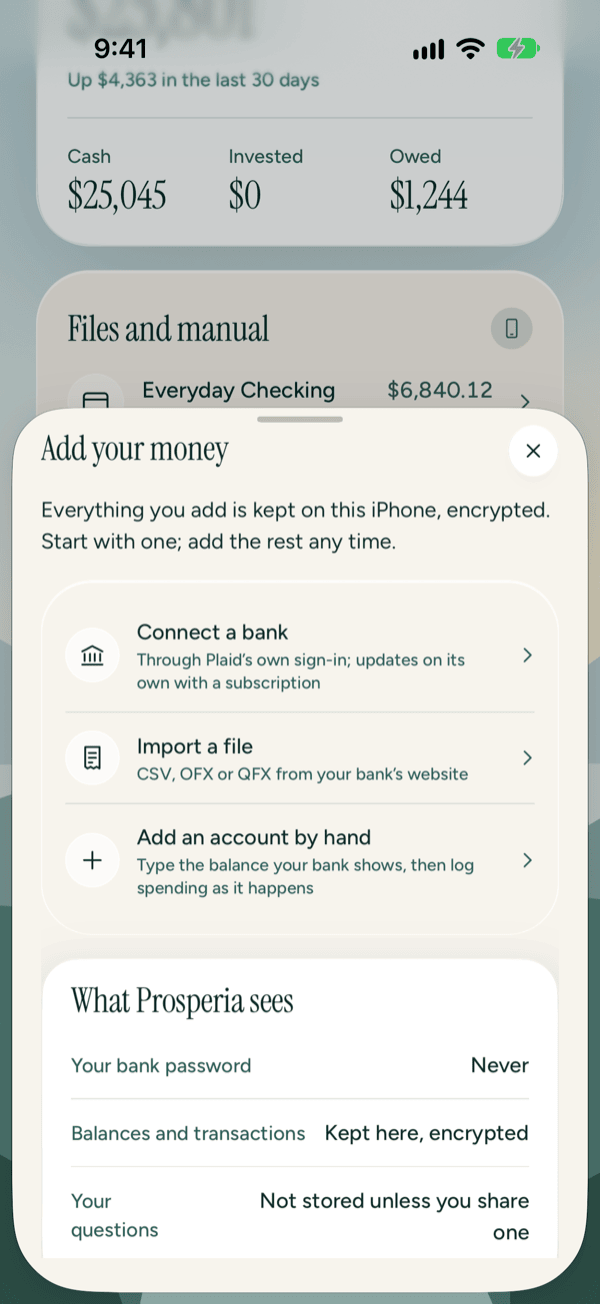
The Add your money sheet sums it up under What Prosperia sees:
| Item | On screen | What it means |
|---|---|---|
| Your bank password | Never | You sign in on Plaid's own sign-in, not in Prosperia. |
| Balances and transactions | Kept here, encrypted | They're stored on this iPhone, in an encrypted database. |
| Your questions | Not stored unless you share one | What you ask isn't kept unless you choose to share it. |
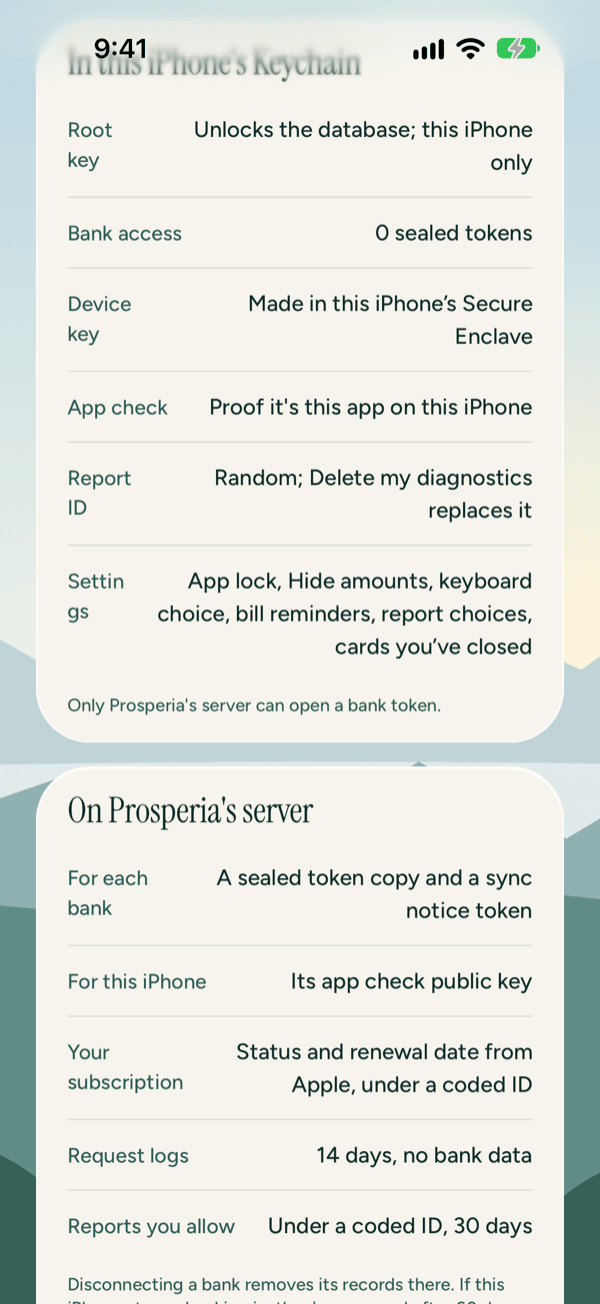
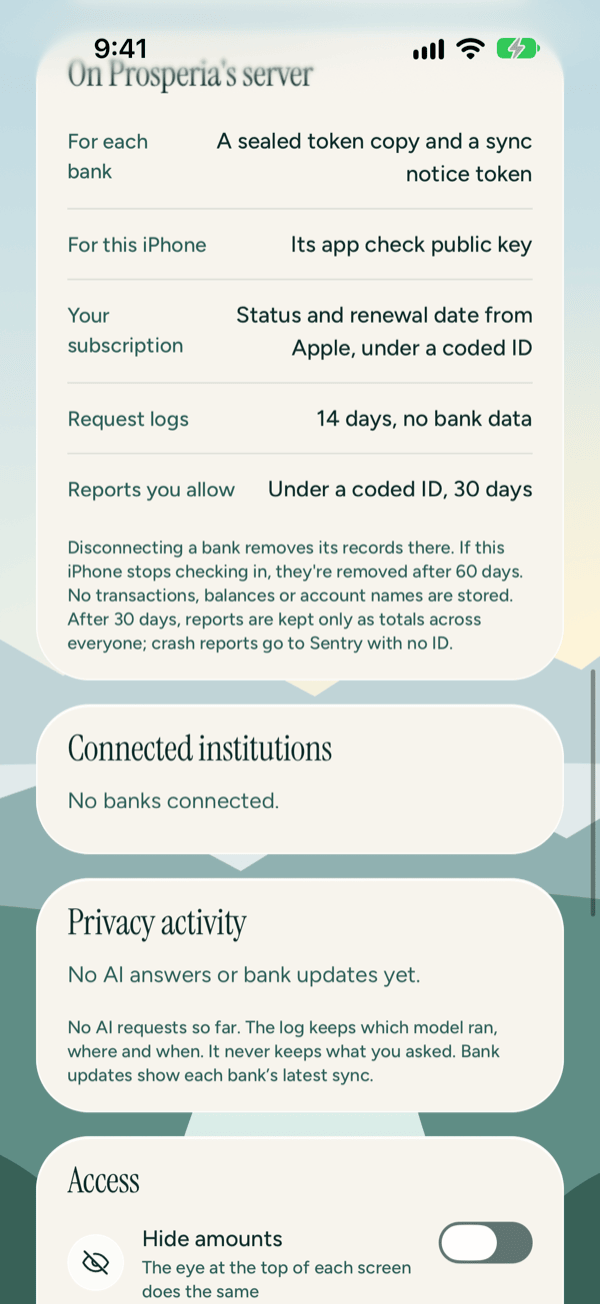
Plaid sends your bank data through Prosperia's server to this iPhone. The server passes it along and doesn't save it. Prosperia's server keeps a sealed access key for each bank, which only it can open, so it can ask Plaid for new transactions. It also keeps a token that tells this iPhone when there's something new. A sealed copy of the key stays in this iPhone's Keychain. The Privacy Center lists exactly what is kept where.
After you connect
The [your bank] is connected sheet shows Getting your transactions… while the first batch arrives. This usually takes a moment.
- If it takes a while, the sheet says This is taking longer than usual. You can close this; your transactions will show up when they're in. It's safe to close it.
- When your transactions are in, tap See where your money went in [month] (for example, November) to open Spending, or Set a budget for one category to start your first budget. See Spending and categories and Flow and budgets.
- Tap Not now to close the sheet and look around on your own.
If the first sync fails, the sheet says Prosperia couldn't get your transactions yet. You can reconnect from Today. Tap Go to Today. If your bank needs you, a card there lets you reconnect (see below). If your bank just isn't answering, the sheet says so instead, and Prosperia tries again on its own.
If connecting fails
If Prosperia can't reach Plaid or its server, you'll see Couldn't connect your bank with Check your connection and try again. Check that you're online, then tap Try again, or Not now to stop.
If Apple still shows a subscription but Prosperia's server says it has ended (for example, after a refund), you'll see Subscription ended instead. Tap Subscribe to start it again, or Not now to stop. A subscription that has simply lapsed opens Apple's subscription sheet from step 4 instead; see Subscription.
Syncing and refresh
Connected banks update on their own. Prosperia checks for new transactions each time you open it, when your bank tells Plaid there's something new, and in the background when iOS allows it.
To check sooner:
- Pull down on Today or Activity to refresh.
- On Accounts, tap Refresh now. This asks each of your banks for anything new, instead of waiting for its next update.
Refresh now appears only once you've connected at least one bank. While it works, the button reads Refreshing…. When it finishes, you'll see one of these under the button:
| Message | What it means |
|---|---|
| Asked your banks for anything new. It can take a few minutes to arrive. | It worked. New transactions show up as your banks send them. |
| Your banks were asked a few minutes ago. Try again shortly. | Your banks were already asked recently, for example just before you reopened Prosperia. Wait a few minutes. |
| Couldn't refresh every bank. Try again later. | At least one bank didn't answer. A bank that needs you shows a card (see below). |
| Couldn't refresh. Check your connection and try again. | Prosperia couldn't reach its server. Check that you're online. |
Each bank can be refreshed once every 5 minutes. After you tap Refresh now, the button reads Refresh again in 5 min, counts down, and can't be tapped until it reads Refresh now again. If you close and reopen Prosperia, the button may come back sooner, but your banks still answer at most once every 5 minutes, so you may see Your banks were asked a few minutes ago. Try again shortly.
Your connected accounts appear on Accounts under Through Plaid, with the bank's name and the last four digits of each account. Loans appear under Loans. See Accounts.
When a bank needs you
A card shows on Today, Activity and Accounts when a bank has a problem, or when it hasn't updated for a day. The card gives the reason in plain words. If your numbers haven't updated in a day or more, it also says when they were last updated, for example Last updated yesterday or Last updated Oct 3. When every bank is fine, there's no card.
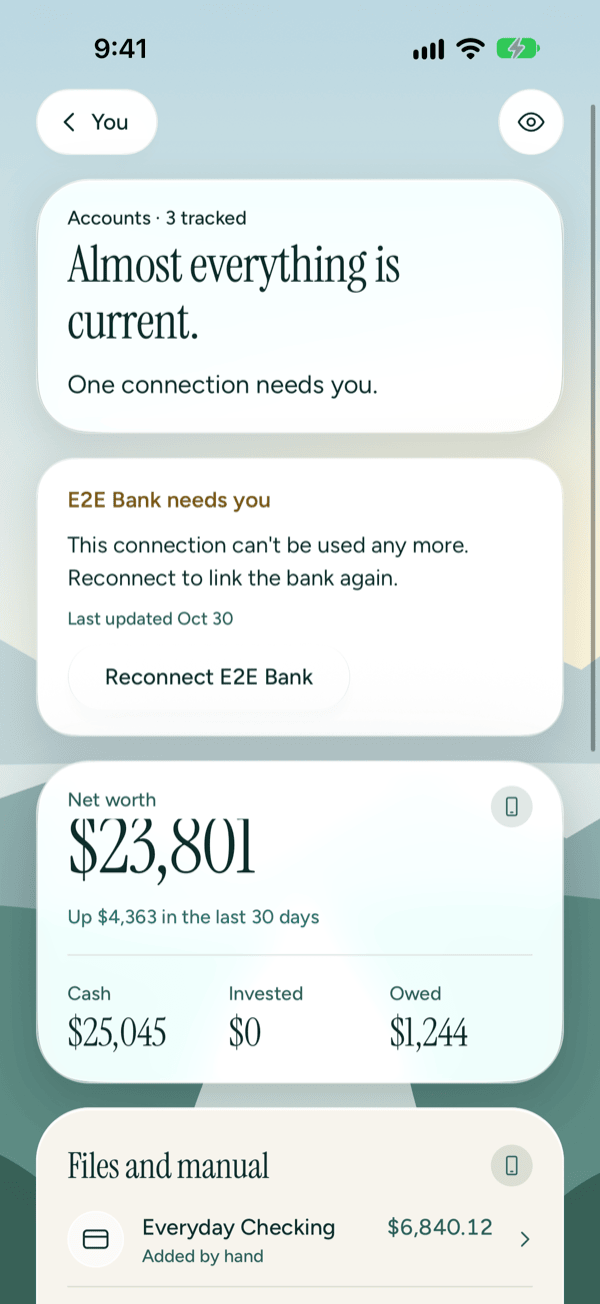
On Accounts, the line under the headline sums it up. One connection needs you. (or 2 connections need you.) means at least one bank needs you to reconnect. One bank isn't updating right now. (or 2 banks aren't updating right now.) means your banks are waiting on something you don't need to fix. Each account from a bank that needs you shows a short reason, like Sign in again, in place of the bank's name.
What the card's title means
| Title | What it means | What to do |
|---|---|---|
| [bank] needs you | Reconnecting can fix it. | Tap Reconnect [bank] and sign in again through Plaid. |
| [bank] is out of date | Reconnecting won't help. The bank, your internet connection or Prosperia's server is the problem. | Usually nothing: Prosperia tries again on its own. Follow the reason on the card. |
| [bank] stopped syncing | Your subscription has ended. | Tap Subscribe. See Subscription. |
Every reason you may see
When a bank is marked as needing attention, its short reason is what each account from that bank shows on Accounts, and what the bank shows under Connected institutions in the Privacy Center. Asked recently, Can't reach Prosperia and Out of date show only on the card.
| What the card says | Short reason | Card title | What to do |
|---|---|---|---|
| Your bank needs you to sign in again. | Sign in again | needs you | Tap Reconnect and sign in. |
| Your bank locked the sign-in after too many tries. Unlock it with your bank, then reconnect. | Unlock at your bank | needs you | Unlock it with your bank first, then tap Reconnect. |
| Your bank needs you to finish a step on its website, then reconnect. | Finish setup at your bank | needs you | Finish that step on your bank's website, then tap Reconnect. |
| Prosperia can't read these accounts any more. Reconnect to choose them again. | Choose accounts again | needs you | Tap Reconnect and choose the accounts to share again. |
| This connection can't be used any more. Reconnect to link the bank again. | Reconnect needed | needs you | Tap Reconnect to link the bank again. Your edits carry over (see below). |
| Something went wrong with this bank. Try reconnecting. | Needs you | needs you | Tap Reconnect and sign in. |
| Your bank isn't answering right now. Prosperia will try again. | Bank not answering | out of date | Wait. Your bank may be down for maintenance; Prosperia tries again. |
| Prosperia couldn't refresh this bank. It will try again. | Couldn't refresh | out of date | Wait. The problem is on Prosperia's side, and it tries again. |
| Your banks were asked a few minutes ago. Prosperia will try again shortly. | Asked recently | out of date | Wait a few minutes. |
| Couldn't reach Prosperia's server. Check your connection. | Can't reach Prosperia | out of date | Check that you're online, then pull down on Today. |
| Prosperia hasn't heard from this bank in a while. Pull down to try again. | Out of date | out of date | Pull down on Today to refresh. If it keeps happening, check that Background App Refresh is on for Prosperia in the iPhone's Settings app. |
| Subscribe to keep your banks syncing. … | Subscription ended | stopped syncing | Tap Subscribe. See Subscription. |
Reconnect a bank
- Tap Reconnect [bank] on the card. Or open the Privacy Center, tap the bank under Connected institutions, then tap Reconnect [bank]. The Privacy Center offers this only when reconnecting can fix the problem.
- Plaid's own sign-in opens. Sign in, and choose your accounts again if Plaid asks.
- When it works, nothing else pops up. The card goes away and your bank syncs again.
If your subscription has ended, Prosperia asks you to subscribe before it reconnects. See Subscription.
If reconnecting fails, you'll see Couldn't reconnect your bank with Check your connection and try again. Make sure you're online, then tap Try again, or Not now to stop.
Your edits carry over
If reconnecting has to link the bank again from scratch, Prosperia moves your edits, like categories and notes, to the reconnected accounts. If some edits can't be matched, you'll see a message like Moved 12 of your edits to the reconnected bank. 2 couldn't be matched.
Disconnect a bank
- On Today, tap the person button, then tap Privacy Center.
- Scroll to Connected institutions. Each bank shows how many accounts it has and when it last synced, or, if it has a problem, the short reason (for example Sign in again or Bank not answering).
- Tap the bank, then tap Disconnect [bank].
- You'll see Disconnect [bank]? with Its accounts and transactions leave your lists, and Prosperia stops syncing it. Delete everything erases them from this iPhone. Tap Disconnect to confirm.
If disconnecting fails, you'll see Couldn't disconnect. Check your connection and try again. Make sure you're online and try again.
What happens to your data
When you disconnect a bank:
- Prosperia tells Plaid to end its access to that bank, and removes the bank's sealed key from Prosperia's server and from this iPhone.
- Prosperia stops syncing that bank.
- Its accounts and transactions leave your lists.
They still take up space in the encrypted database on this iPhone until you use Delete everything in the Privacy Center, which erases them for good. Delete everything also disconnects every bank you still have connected.
If your subscription ends, your banks stop syncing, but nothing is taken away. See Subscription.
If you restore Prosperia from an export, your banks come back without their connections. Reconnect them in the Privacy Center to keep them syncing.
Each bank's latest sync shows in Privacy activity in the Privacy Center as Bank sync with the bank's name.
Good to know
- Needs a subscription. Connecting and syncing banks is the paid part of Prosperia: $5.99 a month or $49.99 a year, with a 14-day free trial. See Subscription.
- Needs the internet. Connecting and syncing go through Plaid and Prosperia's server.
- No AI needed. Connecting banks works on every supported iPhone, with or without Apple Intelligence.
- Prosperia only reads. It can't move money, make payments or change anything at your bank.
- Rather not connect? You can import a file from your bank's website or add an account by hand. See Accounts.
- Still stuck? See Troubleshooting and contact or write to support@stewmore.dev.
Still stuck? See Troubleshooting and contact, or write to support@stewmore.dev.